mode-first setup (v0.5.0)
模式优先的会前选择:开会前先选「怎么听」——麦克风、标签页音频、系统/App 音频,还是导入文件——而不是先挑转录引擎;应用照这个选择和当前平台自动配好对应引擎,新手引导也按这个顺序重新走了一遍。
Mode-first setup: before a meeting, choose how you're listening — microphone, tab audio, system/app audio, or an imported file — instead of picking an engine directly; the app matches the right engine and its configuration to that choice and your platform, and onboarding now follows the same order.
real-time transcription
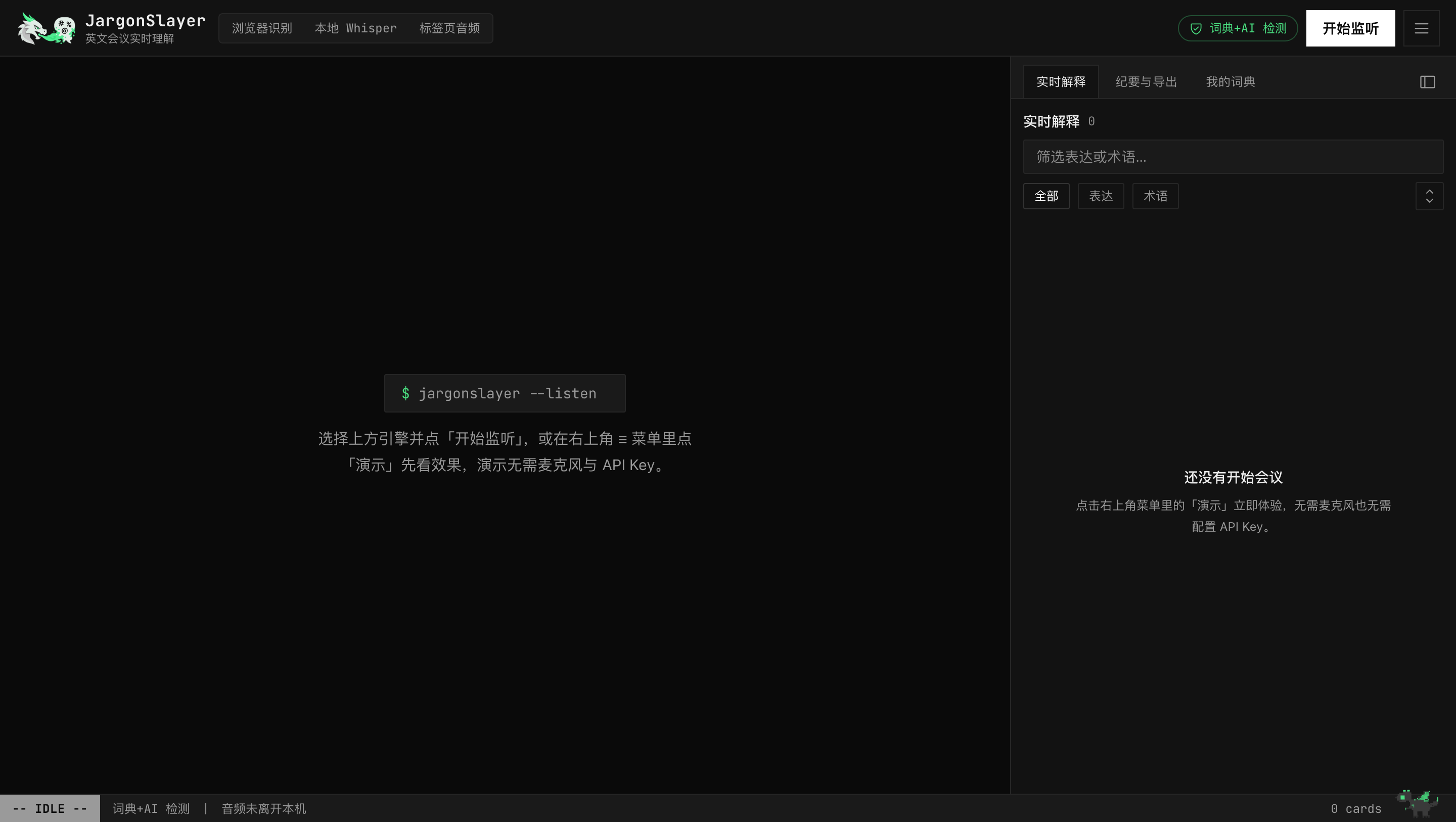
实时转录:浏览器识别 / 本地 Whisper / 标签页音频(后两者音频不出本机),每个引擎带「本地 / 云端」数据去向标识;Chrome 139+ 浏览器识别优先走设备端——音频留在本机,状态栏亮起绿色「音频在本地处理」;另有实验性 Soniox 实时引擎(自备 Key),面向中英夹杂场景;新增 ElevenLabs 云端引擎(自备 Key,按量计费)。浏览器识别由 VAD 监督器把关——轮换只切真停顿、恢复不丢缓冲、语言不匹配给一次提示而非悄悄丢句。内置演示零依赖看完整流程。桌面版的转录引擎不同,见下方「系统/App 音频」。
Browser speech recognition, local Whisper, or tab audio (the latter two never leave the machine). Every engine is labeled local / cloud so the data path is visible at a glance; on Chrome 139+ browser recognition prefers on-device — audio stays local and the status line shows the green chip — and an experimental Soniox realtime engine (BYOK) targets code-switched zh-en; a new ElevenLabs cloud engine (BYOK, pay-per-use) joins the lineup. Browser recognition is guarded by a voice-activity supervisor — rotations land in real pauses, recovery never discards buffered speech, a language mismatch gets one hint instead of silent loss. A zero-dependency demo shows the whole flow. The desktop app has a different engine lineup — see 系统/App 音频 below.
elevenlabs stt, local usage, keychain (v0.6.0)
ElevenLabs 识别 · 本地用量 · 钥匙串:语音识别新增 ElevenLabs 云端引擎,自带 Key 按量计费;用量统计记在本机,设置里随时可查,不上传服务器;API Key 现在存进 macOS 钥匙串,首次启动自动迁移旧存储。
ElevenLabs STT · local usage · Keychain: a new speech recognition engine, ElevenLabs cloud STT — bring your own key, pay per use. Usage stats are tracked locally, viewable anytime in Settings, never uploaded. API keys now live in macOS Keychain, auto-migrated on first launch.
system / app audio (desktop)
系统/App 音频(桌面版,macOS 14.4+):开会用 Zoom、Teams、微信这类原生 App 时,桌面版能直接转录对方说的话——不需要虚拟声卡,不需要装 BlackHole。音频来源选「系统/App 音频」,macOS 会弹一次「系统音频录制」授权——这是它自己的权限类别,跟麦克风、屏幕录制都无关。它只捕获这台 Mac 正在播放的声音,从不碰麦克风;音频只送到本机的 Whisper 服务,「音频在本地处理」标识照常亮起。低于 14.4 的系统会看到该选项置灰并注明原因。它替换了桌面版旧版那个只能失败的「标签页音频」选项——Web 版的标签页音频不受影响。
System/App audio (desktop, macOS 14.4+): when your meeting runs in a native app — Zoom, Teams, WeChat — the desktop app transcribes the other side directly. No virtual audio device, no BlackHole. Pick 系统/App 音频 as the audio source; macOS prompts once for "System Audio Recording" permission — its own category, unrelated to the microphone or Screen Recording. It captures only what this Mac is playing, never the microphone, and audio goes only to the local Whisper sidecar (the 音频在本地处理 badge still applies). Below macOS 14.4 the option shows disabled with an explanation. It replaces the desktop's old tab-audio option, which could only fail inside the app shell; the web app's tab audio is unchanged.
system speech — zero install (desktop, v0.4.3)
系统识别 · 开箱即用(桌面版,macOS 26+):不想下载 1.5GB 模型、不想装 Python?选「系统识别」——转录直接用 macOS 原生语音识别,装完应用就能开第一场会。音频和上面的 系统/App 音频 走同一条系统音频通道,但更进一步:声音在捕获它的那个进程里就地转成文字,连本机内部都不再传输音频。首次监听会自动下载一份系统语音资源(进度见「后台任务」,设置里也能提前下载),支持中英日韩等约 30 种语言,术语表词条还会用于识别偏置。安装向导会让你二选一:系统识别(零配置)或 Whisper(更高精度、支持说话人分离)——随时可换。注意:该引擎不支持说话人分离,中文结果可能不带标点。
System Speech · zero install (desktop, macOS 26+): don't want a 1.5GB model download or a Python runtime? Pick 系统识别 — transcription runs on macOS's native speech recognition, so the app works from the first meeting after install. Audio rides the same system-audio tap as the card above, then goes one step further: it's turned into text inside the very process that captured it, so audio isn't shipped anywhere, not even between local processes. First listen auto-installs a small OS speech asset (progress in 后台任务; you can pre-download in Settings). ~30 locales including zh/en/ja/ko, and your glossary terms bias recognition. The setup wizard offers the choice up front: System Speech (zero setup) or Whisper (higher accuracy, speaker diarization) — switchable anytime. Caveats: no speaker diarization on this engine, and Chinese output may lack punctuation.
english acceleration — opt-in (desktop, v0.4.4)
英文加速(桌面版,Apple 芯片,可选引擎):模型选择器里新增一个可选引擎「英文加速」,不是默认项。它跑在 Apple 芯片(M 系列)本机的 MLX 加速上,专攻英文,比 Whisper 快得多——批量转录约百倍实时。首次选用下载约 2.5GB(含约 1GB MLX 运行环境),音频照样不出这台机器。需要 macOS 14 及以上。注意:暂不支持实时说话人分离。
English acceleration (desktop, Apple Silicon, opt-in): the model picker now offers an optional engine, 英文加速 — not the default. It runs on-device via MLX on Apple Silicon (M-series), is tuned for English, and is far faster than Whisper — roughly 100x realtime in batch transcription. First pick downloads about 2.5GB (including ~1GB MLX runtime); audio still never leaves this machine. Requires macOS 14+. Caveat: no realtime speaker diarization yet.
AI transparency panel (v0.4.6)
AI 透明面板:一眼看清每类 AI 任务——检测、解释、翻译、报告——各自用哪个模型、走自带 Key 还是服务端代理,以及调用、失败、QC 丢弃的次数;状态栏也有一个随时能看的状态小标。没配 Key 时会明确告诉你哪些功能回退到词典、哪些暂不可用,而不是默默出错。
AI transparency panel: see at a glance which model each AI task — detect, explain, translate, report — is using, whether it routes through your own key or the server proxy, and its call / failure / QC-drop counts; a chip in the status line surfaces the same at any moment. With no key configured it says plainly which features fall back to the dictionary and which are unavailable, instead of failing silently.
bilingual transcript
双语字幕:开启后英文每出一句,中文译文即刻跟在下方——会议还在开,你已经读完了;不用等会后报告再回头猜刚才讲了什么。
Live bilingual subtitles: each English sentence gets a Chinese translation the moment it lands — read along while the meeting is still running instead of deciphering a post-meeting summary after the fact.
translation engine choice (v0.5.0)
翻译引擎可选:双语字幕和全文翻译默认用 LLM;Chrome 138+ 可以在设置里切到浏览器内置的本地翻译,翻译完全在这台机器上跑,不用配 API Key,代价是措辞不如 LLM 精细;桌面版 macOS 26+ 还能选 Apple 系统翻译,同样本机运行、无需 Key(见下)。
Translation engine choice: bilingual subtitles and full-transcript translation default to the LLM; on Chrome 138+ you can switch to the browser's built-in on-device translator in Settings instead — it runs entirely on this machine, no API key required, at the cost of some phrasing nuance versus the LLM; on desktop, macOS 26+ also offers Apple's on-device translation as another key-free, fully local option (see below).
apple on-device translation (desktop + iOS, v0.6.0)
Apple 系统翻译(桌面版 macOS 26+ / iOS 26+):翻译引擎新增一项——跑在系统翻译框架上,完全本机处理,不需要配置 API Key,文本不出设备。
Apple on-device translation (desktop macOS 26+ / iOS 26+): a new translation engine option running on the system's own translation framework, fully local — no API key required, and text never leaves the device.
有道翻译 youdao engine (v0.7.1)
有道翻译(桌面版 / iOS,自备 Key):翻译引擎再添一项——有道翻译,按量计费,自备应用ID和应用密钥即可用,英译中约 ¥48/百万字符,新用户有体验金。只在原生 App 可选,网页版因跨域限制暂不支持。
Youdao translation (desktop / iOS, BYOK): another translation engine option — Youdao, pay-per-use, bring your own 应用ID and 应用密钥, roughly ¥48 per million EN→ZH characters, with a new-user trial credit. Native-app only for now; the web app can't reach Youdao's API cross-origin.
会后补全翻译 · 导出跟随翻译 (v0.7.1)
会后补全翻译 · 导出跟随翻译:会议结束后,只要双语字幕开着还有片段没翻译成功,工具栏就会出现「补全翻译」按钮,一键用当前翻译引擎补齐。导出纪要/转录时也认这份翻译——Markdown、docx、复制纪要都会带上已有译文;如果还有未翻译的片段,会先问你「补全后导出」还是「直接导出」(未翻译处原样标出),JSON/Anki/Cornell 导出不受影响。
Post-meeting gap-fill · exports follow translations: after a meeting ends, a 补全翻译 button appears in the toolbar whenever bilingual subtitles are on and some segments never got translated — one click fills them in through the configured engine. Exports honor that work too: Markdown, docx, and copy-to-clipboard summaries now carry existing translations, and if gaps remain you're asked to fill them first or export anyway with gaps marked 未翻译; JSON, Anki, and Cornell exports are unaffected.
import anything
万物导入:一个「导入」入口就在引擎模式旁边:粘贴文稿(.txt / .srt / .vtt)直接解析;丢音频或视频文件进来——Whisper 在浏览器内转录(WebGPU 可用走 WebGPU,否则 WASM;视频经 ffmpeg.wasm 自动剥音轨),文件全程不上传;后台任务托盘看进度、完成即跳转到会话;体验版开箱即用,装了本地 sidecar 还能直接贴视频链接拉取。
Import anything: one 导入 entrance beside the engine modes: paste a transcript (.txt / .srt / .vtt), or drop in an audio/video file — Whisper transcribes right in the browser (WebGPU when available, WASM otherwise; video via ffmpeg.wasm). Nothing gets uploaded; a background task tray tracks progress and jumps to the finished session. Sidecar users can also import from a video URL.
expression detection
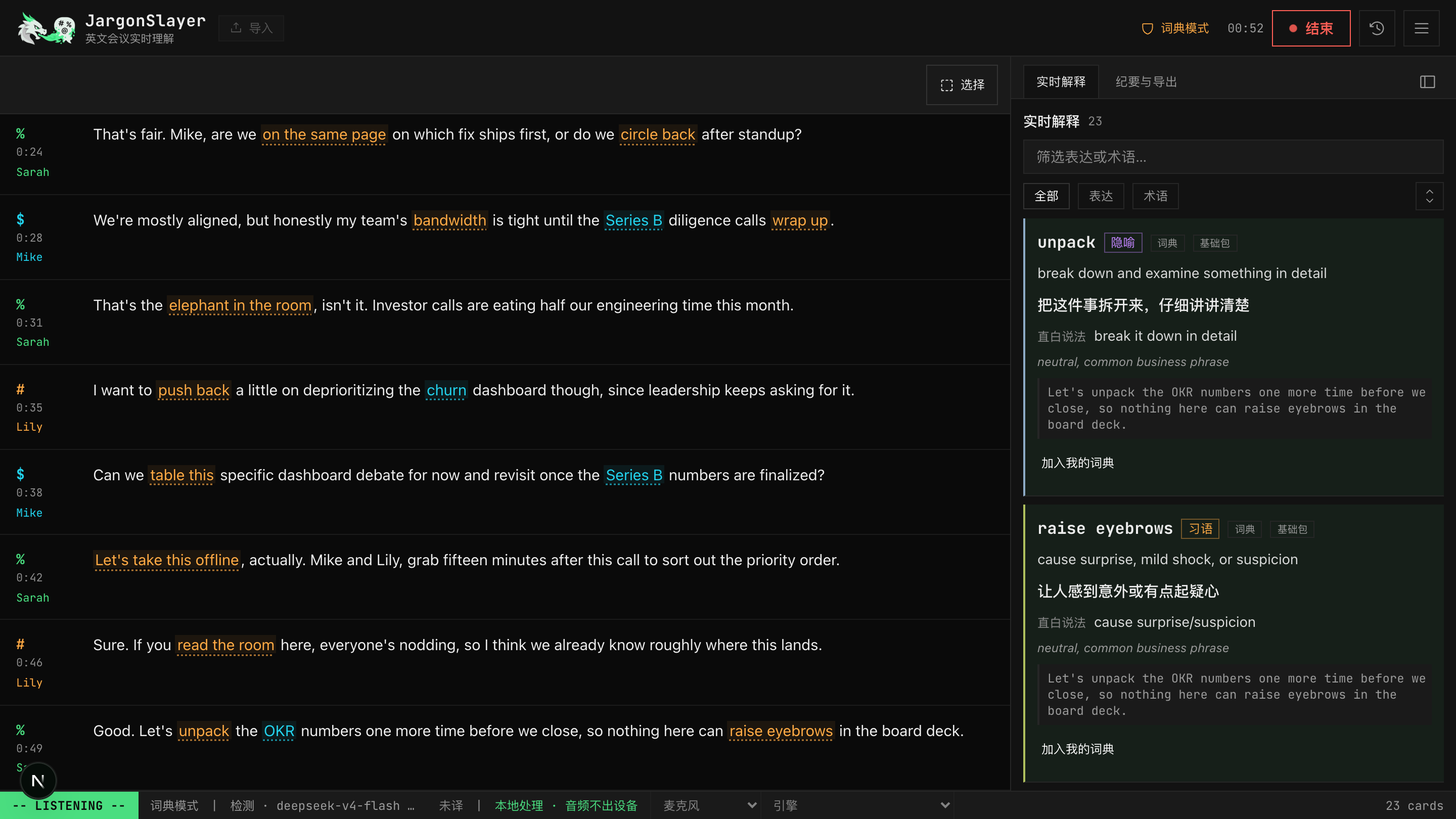
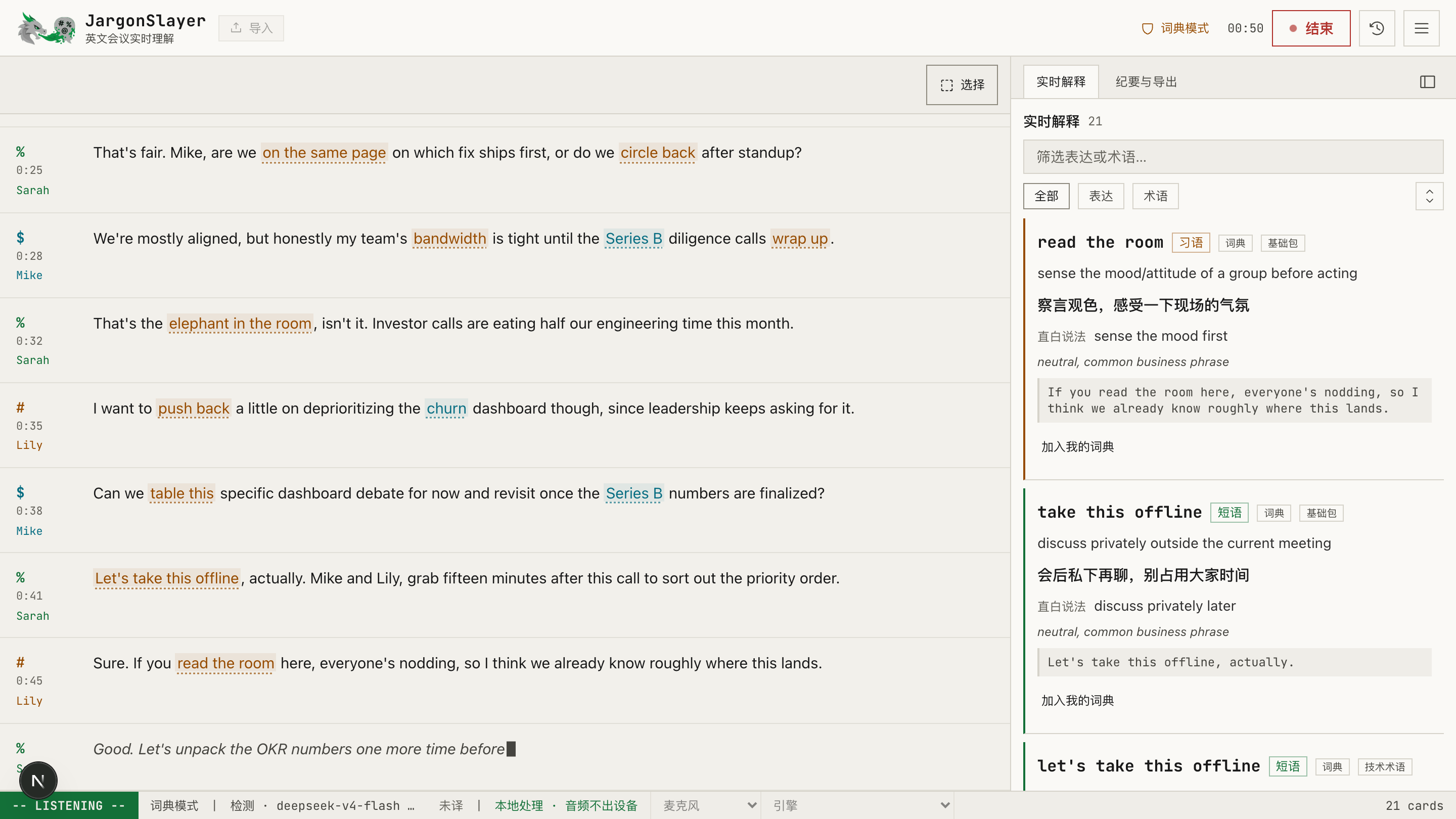
实时表达检测:LLM 结合前后语境判断,只解释"字面意思 ≠ 实际意思"的表达,专有名词/缩写单独成术语条。内置词典(650+ 条、14 个主题包,含医药生物科技、统计学、机器学习、生物信息学)是始终在线的即时底层——命中立刻出卡,AI 再就地升级解释;关掉 AI 就是纯离线模式(v0.6 起词典模式已是默认检测方式,AI 模式转为可选 Beta),还能从 GitHub 安装社区词典包,也能自己建多个自定义命名词包分开管理。解释语言可切中文或英文。
Real-time expression detection: an LLM uses surrounding context to explain only what "literal ≠ actual" (it can tell whether table this means shelving a topic or furniture); proper nouns get separate term cards. A built-in dictionary (650+ entries, 14 topic packs incl. pharma/biotech, statistics, ML and bioinformatics) is the always-on instant layer — hits render immediately and the AI upgrades them in place; with AI off it works fully offline (as of v0.6, dictionary mode is the default — AI mode is now opt-in beta). Community packs install from GitHub, and you can also create your own named custom packs to keep topics separate.
dictionary pack catalog, multi-sense ranking (v0.6.0)
词典包目录 · 多义词排序:设置里可从官方目录一键安装 6 个专业词典包——医学、生物医药、AI/ML、法律、金融商务、工程计算机,共 4300+ 词条;也能从文件或 GitHub 链接导入第三方包,已装的包每天自动检查更新。内置词典另新增三个通用包共 271 条:新兴用法(harness、agent、RAG…)、钱与福利(保险/薪酬/股权)、日常口语与俗语。多义词按语境排序——像 EMT 这种在不同领域含义不同的词,会自动把当前会议最可能的解释排前面。变体匹配(85 条)能识别屈折和近似形式,例如词典收录 keep the ball rolling,说话人说了 get the ball rolling 同样命中。词典包目录见 jargonslayer-dicts。
Dictionary pack catalog · multi-sense ranking: install 6 specialized packs from the official catalog in Settings — medicine, biopharma, AI/ML, law, finance, engineering — 4,300+ terms total; import third-party packs from a file or GitHub link too, and installed packs auto-check for updates daily. Three new built-in general packs add 271 more terms: emerging usage (harness, agent, RAG…), money & benefits, and everyday idioms & slang. Multi-sense terms now sort by context — a word like EMT that means different things in different fields gets the most likely definition for the current meeting ranked first. Variant matching (85 entries) catches inflected and alternate forms — get the ball rolling matches keep the ball rolling. Catalog: jargonslayer-dicts.
词典多义按场景选 domain-aware senses (v0.7.4)
词典多义按场景选:词典学会按场景选义项。讲癌症恶病质时,CAC 解释成 Cancer-Associated Cachexia,不再默认是获客成本。「IND … or NDA or BLA」句子里,NDA 认成新药申请。机器学习语境里,PR 指 precision-recall,不是 Pull Request。释义跟着会议领域走,领域不明时也能给出一版可用的解释。
Domain-aware senses: the dictionary now reads context before picking a sense — in a cachexia talk, CAC resolves to Cancer-Associated Cachexia instead of defaulting to Customer Acquisition Cost; inside "IND … or NDA or BLA," NDA becomes New Drug Application; in an ML talk, PR means precision-recall, not Pull Request. Sense selection follows the meeting's domain, and an unclear domain still returns a usable definition.
划词先查词典 select-to-lookup rework (v0.7.4)
划词先查词典:选中任意文字,先查词典。命中的词典包和义项全部列出,不再只留一个赢家。真查不到时,AI 结合上下文解释并翻译。「加入我的词典」退到弹窗里的次要位置,不再是唯一动作。
Select-to-lookup rework: selecting text now runs a dictionary lookup first — every matching pack and sense gets listed instead of a single winner. A genuine miss falls through to an AI explanation with translation, using surrounding context. 加入我的词典 drops to a secondary action in the popover instead of being the only one.
翻译不再无声死掉 · 提示词按领域分配 translation recovery & domain-weighted hints (v0.7.5)
翻译不再无声死掉,提示词按领域分配:以前启动握手失败一次,就把整场会议的翻译通道锁死,只有开头一条提示,之后一片空白——同一天同样设置的另一场却正常出双语。现在通道自动重连,真恢复不了状态栏写「翻译失败」,不再装作还在工作。识别提示词也换了分法:系统识别接受一组提示词来提高专业术语的转录准确率,以前平均分给所有启用的词典包,一场生信报告大部分预算花在金融和日常词汇上;现在按当前会议领域加权,个人生词本也不再独占整个预算。这只提高已有词条被正确转录的概率,不等于新增词条。桌面版「麦克风」模式录到静音的问题同版修复。
Translation recovery & domain-weighted hints: a single failed startup handshake used to latch the translation lane off for a whole meeting — one notice at the start, then nothing, while another session the same day on the same settings stayed fully bilingual. The lane now retries on its own, and a genuine failure says 翻译失败 instead of looking like it is still working. Recognition hints changed too: the system recognizer takes a limited list of hint terms, and that list was split evenly across every enabled dictionary pack, so a bioinformatics talk spent most of its budget on finance and everyday vocabulary. Hints now weight toward the meeting's actual domain, and a large personal glossary no longer consumes the whole budget first. This improves the odds a specialist term is transcribed at all; it does not add new dictionary entries. Same release fixes desktop 麦克风 mode recording silence.
card experience
卡片体验:表达/术语共享同一块状样式,分类色左边条区分;重复出现只计数不刷屏;转录内高亮表达可点定位;选中任意文字先查词典——命中的包和义项全部列出,真查不到时 AI 结合上下文解释并翻译,「加入我的词典」退到次要位置;存词时记的是它在这场会议里实际出现的说法,不只是词典的标准写法,复习时更好认。
Card experience: expression and term cards share one block style with category-colored status bars; repeats increment a counter instead of flooding the feed; underlined expressions in the transcript jump to their card; select any text to look it up in the dictionary first — every matching pack and sense lists, and a genuine miss falls through to an AI explanation with translation; adding it to your glossary is a secondary action, not the default one; saving records the exact wording it appeared as in that meeting, not just the dictionary's canonical form, so it reads better on review.
appearance & themes
外观与主题:九套内置主题——终端深色(默认)、终端浅色、高对比深色,加上水墨、魔典、黑金、青绿,以及新增的像素(8-bit 任务日志)和笔记(课堂手绘)——跑在严格校验的 17-token 引擎上,每套对比度都按 WCAG AA 逐项测过。想自己调?主题编辑器能新建或复制一套,17 个 token 逐个改、带实时对比度提示,一键导出/导入 JSON。界面字体和等宽字体各自可选系统预设或自定义字体,另有毛玻璃浮层开关和四档全局字号。原生控件与应用图标跟随当前深浅方案。
Appearance & themes: nine built-in themes — terminal dark (default), terminal light, high-contrast dark, plus ink-wash 水墨, grimoire 魔典, noir 黑金, mineral-green 青绿, and the new pixel quest-log 像素 and classroom-sketch 笔记 — on a strictly-validated 17-token engine, each contrast-checked against WCAG AA. Want your own? A theme editor creates or duplicates one, edits all 17 tokens with live contrast hints, and exports/imports JSON. Separate UI and monospace font pickers (system presets or a custom font), a frosted-glass overlay toggle, and four global type sizes round it out. Native controls and the app icon follow the active scheme.
speaker diarization
说话人:上传录音自动转录 + 说话人分离(后台进度,完成自动载入);实时分离 beta(本地运行,标签随会议逐步修正);说话人标签点击即可改名。
Speakers: import a recording for offline transcription + speaker diarization (background job, auto-loads when done), or turn on realtime diarization (beta, local, labels refine as the meeting proceeds). Click a speaker label to rename it.
speaker assignment (v0.5.0)
说话人工具:给某一句手动指定说话人,或批量选中多句一起改;单句操作里有「应用到本句及之后」,一路改到底不用逐句点;实时监听时侧边跟着一个「当前说话人」标记。手动指定过的句子会被锁定,后续的自动说话人分离更新不会覆盖它。
Speaker tools: assign a speaker to one line, or select several to batch-assign; a per-line "apply to this and following" carries a change forward without clicking every line, and a "current speaker" tag tracks along in the sidebar while you listen. Once you assign a speaker manually, that line is locked — later automatic diarization updates won't overwrite it.
post-meeting artifacts
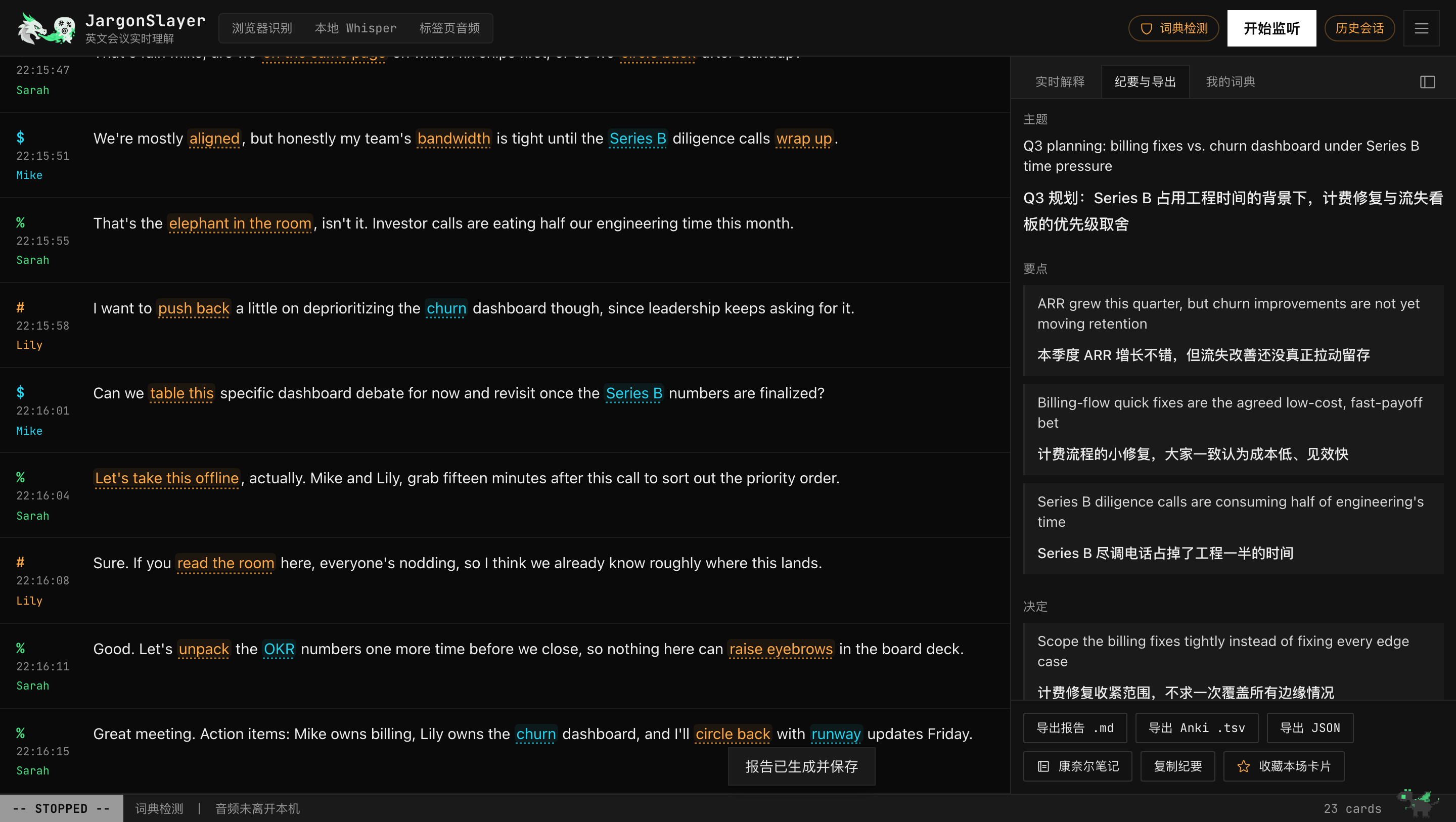
会后产物:双语纪要(主题/要点/决定/行动项)、逐段对照全文、学习卡片、康奈尔笔记(正文高亮 + 右栏批注 + 小结,可导出 PNG/Markdown);另有 Markdown / docx / Anki TSV / JSON 导出与自动落盘、webhook;AnkiConnect 还能一键把生词卡直接同步进本地 Anki,自动去重。
Post-meeting artifacts: bilingual summary (topic / key points / decisions / action items), paragraph-aligned translation, study cards, and a Cornell-note sheet (highlighted body + margin annotations, exportable as PNG or Markdown); plus Markdown / docx / Anki TSV / JSON export, auto-save to a folder, and a webhook; AnkiConnect can also sync new cards straight into your local Anki in one click, with dedup.
AI transcript correction (v0.5.0)
AI 转写修订(审阅制):会后一键让 AI 通读整场转录、挑出识别错误,逐段列出原文与修正建议,你逐条确认——点「接受」才会真的改文本,AI 不会替你悄悄改;接受的片段如果开着双语字幕,会自动重新翻译。
AI transcript correction (reviewed): one click after the meeting has the AI read the whole transcript and flag recognition errors, listing the original text and a suggested fix segment by segment for you to confirm — nothing changes until you click accept, the AI never edits silently; accepted segments with bilingual subtitles on get re-translated automatically.
learning center
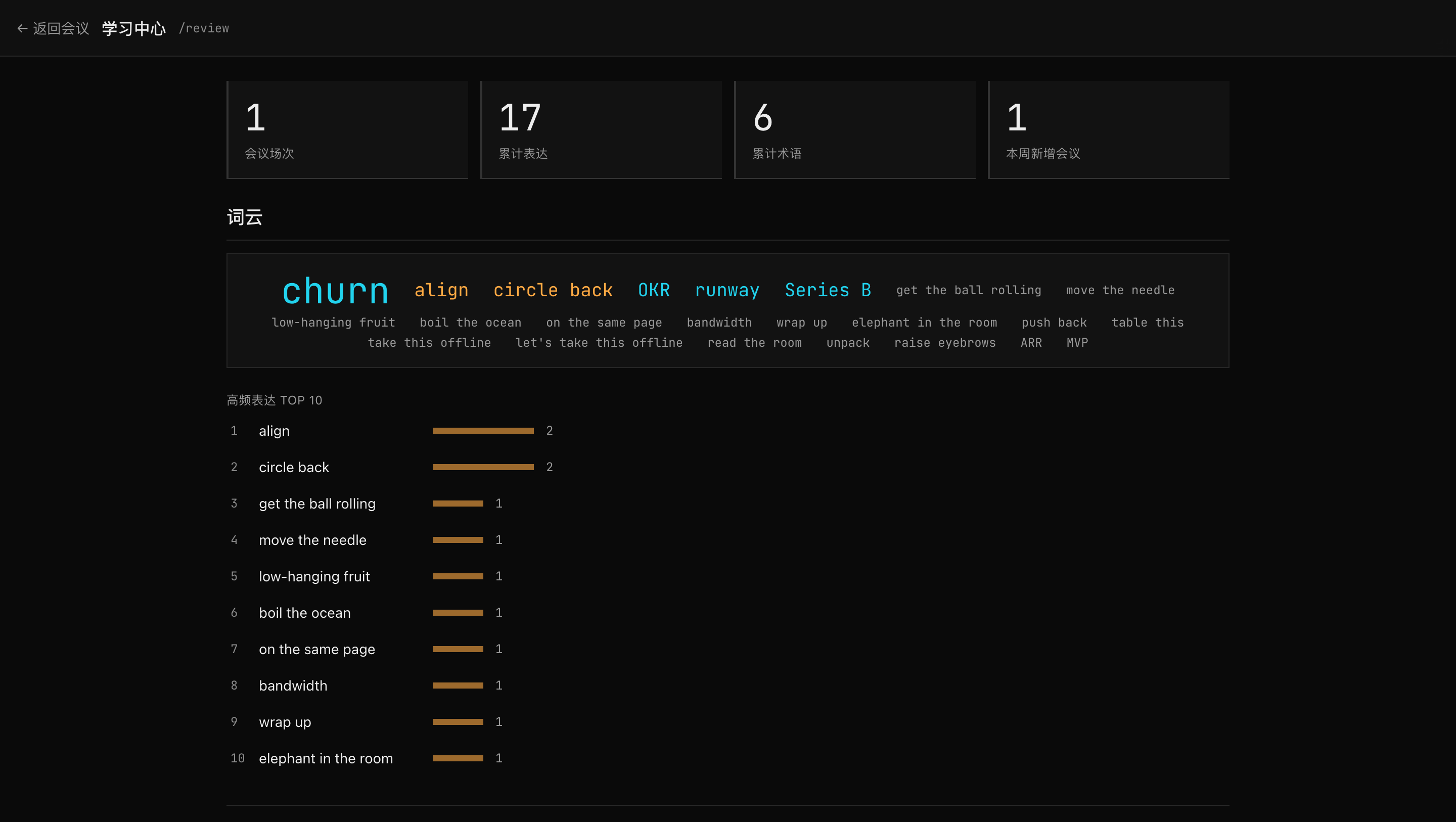
学习闭环:卡片上点「太简单 / 别再提示」,认识的词不再打扰(带撤销和 90 天回炉防误标);/review 新增到期复习(不认识 / 模糊 / 认识三档评分,SM-2 间隔排期)+ 已知词管理,翻卡浏览、统计、词云照常可用;个人词典已并入学习中心,纳入后续会议检测。
Learning loop: mark a card 太简单/别再提示 and known terms stop surfacing (with undo + a 90-day refresher); /review adds due-driven spaced repetition (three-grade SM-2 scheduling) and a known-words list beside browsing, stats, and the word cloud; your glossary — now part of the learning center — still feeds detection.
BYOK, multi-model
BYOK / 多模型:Anthropic 直连或任意 OpenAI 兼容端点(DeepSeek / Qwen / OpenRouter / Ollama);OpenRouter 支持一键 OAuth 生成 Key,Poe 订阅有内置预设。Key 存本机浏览器;自托管网页版调用时经你自己的服务内存转发(不落盘),也可用环境变量让 Key 完全不进浏览器。托管体验版现已开放自带 Key:填入后由浏览器直连模型服务商,Key 与会议内容不经过本站服务器(自定义端点需支持浏览器跨域 CORS)。
BYOK, multi-model: Anthropic direct or any OpenAI-compatible endpoint (DeepSeek / Qwen / OpenRouter / Ollama); OpenRouter OAuth can provision a key in one click, and Poe has a built-in preset. A UI-entered key lives in your browser; on a self-hosted web build it is relayed in memory through your own server, never persisted, and env keys skip browser storage entirely. The hosted preview now takes your own key too: calls go straight from your browser to the model provider — key and meeting content never touch this site's server (custom endpoints need browser CORS support).
crash recovery (v0.5.0)
崩溃恢复:会议进行中转录会实时写自动草稿;页面刷新、标签页被关、浏览器崩溃后重新打开,历史里会出现一条「恢复到历史记录」提示,一键找回崩溃前的全部内容,不再因为一次意外丢掉整场会议。
Crash recovery: while a meeting runs, the transcript is saved to an auto-draft in real time; after a page refresh, a closed tab, or a browser crash, history shows a 「恢复到历史记录」 prompt that restores everything up to that point in one click — a meeting no longer disappears because of an accident.
history, no accounts
会议历史:全部存浏览器 IndexedDB,无账号,支持搜索曾出现过的表达;一键全量备份/恢复。
History without accounts: everything in IndexedDB; search old meetings by expression; one-click full backup and restore.
desktop app — macOS, signed & notarized
桌面版:Tauri 原生应用,macOS(Apple Silicon)签名并公证的安装包,下载即用。首次启动的向导先征求同意,再把独立 Python 环境和你选的 Whisper 模型(四档,预选 medium)装进应用自己的数据目录,不碰系统 Python,删掉目录就是干净卸载;换模型在现有服务旁边下载、下载完成才切换,说话人分离扩展一键安装。向导之后还有两步可跳过的引导:一键 OAuth 连接 OpenRouter(或直接粘贴 Key)、配置说话人分离用的 Hugging Face token——随时能在设置里补上。底部状态栏新增后台任务中心和引擎下拉菜单,本地转录延迟持续偏高时会有提示。
Desktop app: a native Tauri app with a signed, notarized installer for macOS (Apple Silicon) — download and go. The first-run wizard asks consent, then installs an isolated Python runtime plus the Whisper model you pick (four sizes, medium pre-selected) under the app's own data directory; it never touches system Python, and deleting the directory is a clean uninstall. Model switching downloads beside the live server and only then swaps; the diarization add-on installs in one click. Two skippable onboarding steps follow the wizard: one-click OAuth into OpenRouter (or paste a key) and a Hugging Face token for speaker diarization — both revisitable from Settings later. The bottom status bar adds a background task center and an engine dropdown, plus a heads-up when local transcription latency stays elevated.