What JargonSlayer Does
JargonSlayer is a real-time English-meeting comprehension assistant for non-native speakers. It listens to a meeting, catches the parts a dictionary alone would miss — idioms, business slang, indirect phrasing, acronyms, proper nouns, domain terms — and turns them into short cards while the meeting is still running. After it stops, the same session becomes a bilingual summary, a translated transcript, and a personal study deck.
Live, in the meeting
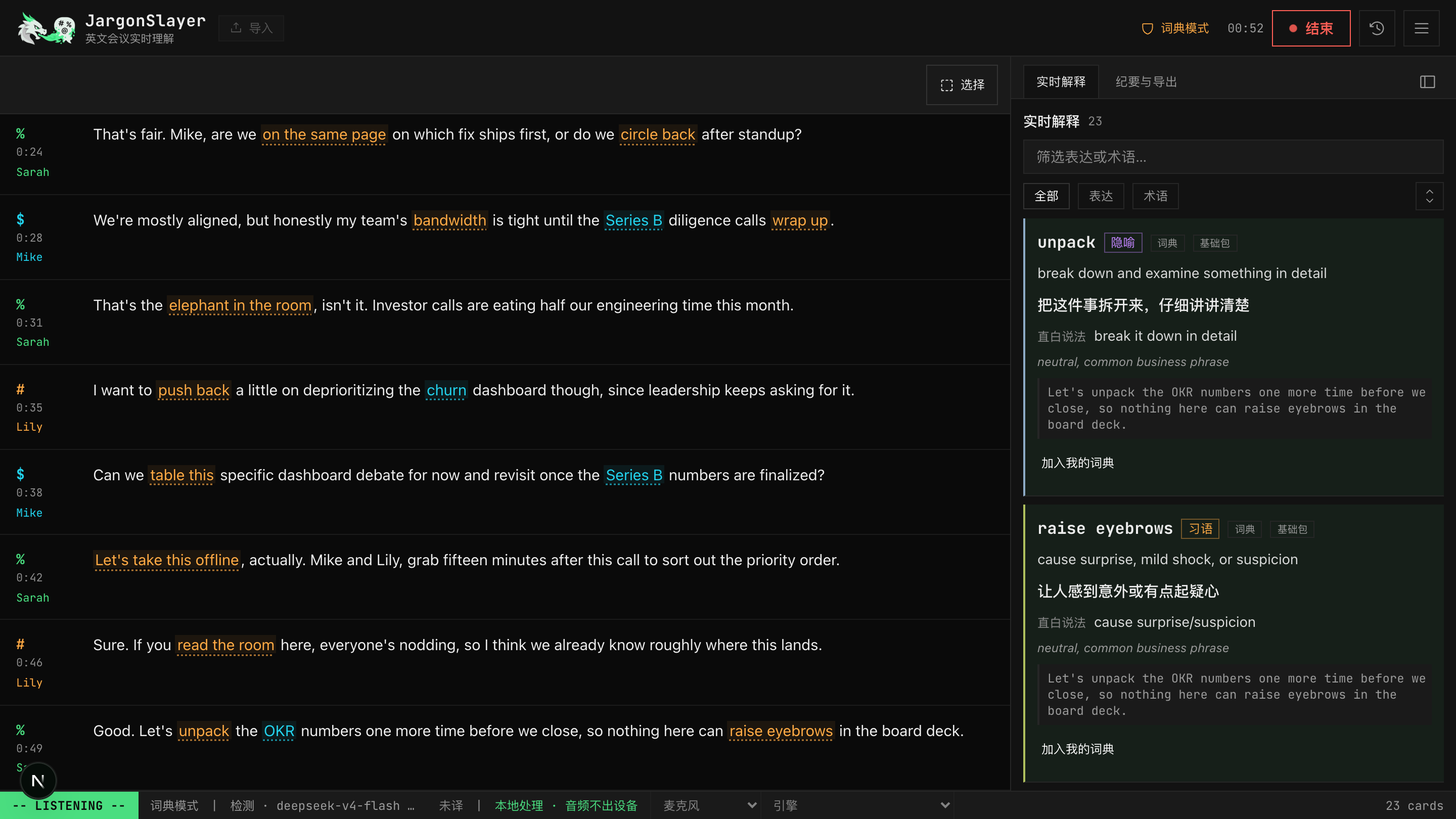
Dictionary detection is instant and fully offline. Turn on AI and it upgrades the same cards with fuller, context-aware explanations, and lets you look up anything by selecting it.
After the meeting
Bilingual summaries, full-transcript translation, and a spaced-repetition review queue turn a transcript into study material.
Your data stays yours
Every mode has an explicit data path. Dictionary-only, local Whisper, and 系统识别 never send audio anywhere; AI and cloud STT are opt-in and bring-your-own-key.
Live Comprehension
Detection has two layers. The built-in dictionary matches idioms, acronyms, and domain terms the instant they're spoken, entirely offline — no key, no cost, and the default for new installs since v0.6. Turning on AI 检测 layers an LLM on top: it explains meaning in context and catches things the dictionary doesn't know, using whichever provider you've configured — Anthropic, OpenAI, DeepSeek, 通义千问, OpenRouter, Poe, a local Ollama model, or any OpenAI-compatible endpoint.
The right panel shows explanation cards for expressions — idioms, indirect phrasing, softened criticism — and term cards for acronyms, companies, products, metrics, and technical terms. A repeated hit increments the original card instead of flooding the feed, and clicking an underlined expression in the transcript jumps straight to its card.
Multi-sense, domain-aware definitions (v0.7.4): a headword with more than one definition now ranks them by the meeting's domain. CAC resolves to Cancer-Associated Cachexia in a cachexia talk rather than Customer Acquisition Cost, NDA to New Drug Application inside "IND … or NDA or BLA," and PR to precision-recall rather than Pull Request in an ML talk. An unclear domain still returns a usable definition.
划词 lookup, rebuilt for lookup-first (v0.7.4): select any transcript text to look it up. Matching dictionary packs and senses are listed first; a genuine miss falls through to an AI explanation with translation, using surrounding context. The lookup keeps generating in the background and lands in the card list even if you close the popover — adding it to your glossary (加入我的词典) is a secondary action inside it, not the default one.
Transcription Engines and Audio Sources
The web app and the desktop app offer different engine lineups — desktop drops browser-based recognition entirely (Tauri's webview has no Web Speech API) and adds a CoreAudio-based system/app audio capture the web app can't do. As of v0.7.4 the engine picker groups every option into three families:
- 本地 STT 模型 (local STT models) — models you run yourself: local Whisper (bundled and self-managed on desktop, a manual sidecar on web) and 英文加速 Parakeet (Apple Silicon, MLX-accelerated, opt-in in the model picker, ~100x realtime in batch inference; no realtime speaker diarization yet).
- 系统 STT 服务 (system STT services) — the OS or browser's own recognizer: browser recognition (on-device on Chrome 139+ when a language pack is available, otherwise the browser vendor's cloud service) and 系统识别 System Speech on desktop (macOS 26+, zero install, no model download, no Python, audio never leaves the capturing process; ~30 locales; no speaker diarization; Chinese output may lack punctuation).
- 第三方 STT 提供商 (third-party STT providers) — BYOK cloud vendors: Soniox (experimental, aimed at code-switched zh-en), Deepgram (English-only), and ElevenLabs (retains transcripts by default unless you're on an enterprise no-retention plan). These stay visible even without a key configured, each labeled 已配置 or 未配置, instead of disappearing until you set one up.
For audio sources: the web app can capture tab audio to hear the other side of an online meeting. The desktop app replaces that slot with 系统/App 音频 — a CoreAudio process tap that captures whatever the Mac is currently playing, with no virtual sound card and no BlackHole/VB-Cable setup. It never captures your microphone. As of v0.7.4, audio source is its own control and can be changed mid-meeting, not just before one starts.
Full setup tables — install steps, audio destination, and best-for guidance for every engine on both platforms — are in the User Guide.
Bilingual Transcript and Translation
Live bilingual subtitles and full-transcript translation share one setting, with four engines to choose from: the platform's on-device translator (系统翻译 — Chrome's built-in Translator API on the web app, Apple's Translation framework on desktop/iOS; the default, no key needed), the LLM, DeepL (BYOK), and 有道翻译 Youdao (BYOK, v0.7.1+). DeepL and Youdao are native-app engines only — neither API allows cross-origin browser requests, so the web app shows them disabled in the picker and the practical web choices are on-device or LLM.
After a meeting stops, a 补全翻译 (N) button appears whenever bilingual subtitles are on and N segments were never translated — a missed API call, a pause with no key configured, and so on. It re-runs just those segments through the configured translation engine in small batches and disappears once they're filled.
Markdown, docx, and copy-to-clipboard exports carry your existing translations. If any segments are still untranslated at export time, a dialog offers to gap-fill first and then export, export now with a 未翻译 marker on what's missing, or cancel.
AI transcript correction (reviewed, since v0.5): one click after the meeting has the AI read the transcript and flag recognition errors, listing the original and a suggested fix segment by segment. Nothing changes until you accept it, and accepted segments re-translate automatically.
Speaker Tools
Assign speakers by hand — one line, or several selected lines at once — with an "apply to this and following" option; a live "current speaker" tag tracks along while you listen. A manually assigned line is locked and survives later automatic diarization. Click any speaker label to rename it — a v0.7.3 fix means the rename now updates the roster and the live speaker picker immediately, instead of sticking on the old name for the rest of the meeting.
Batch imports can diarize recordings through the local sidecar (pyannote), gated behind a Hugging Face token you provide once, after accepting pyannote's segmentation and speaker-diarization usage terms on Hugging Face. Realtime diarization is beta: the sidecar re-runs pyannote on a recent tail window, matches speakers against a stable registry, and sends label updates back to the UI without blocking transcription.
Learning Center
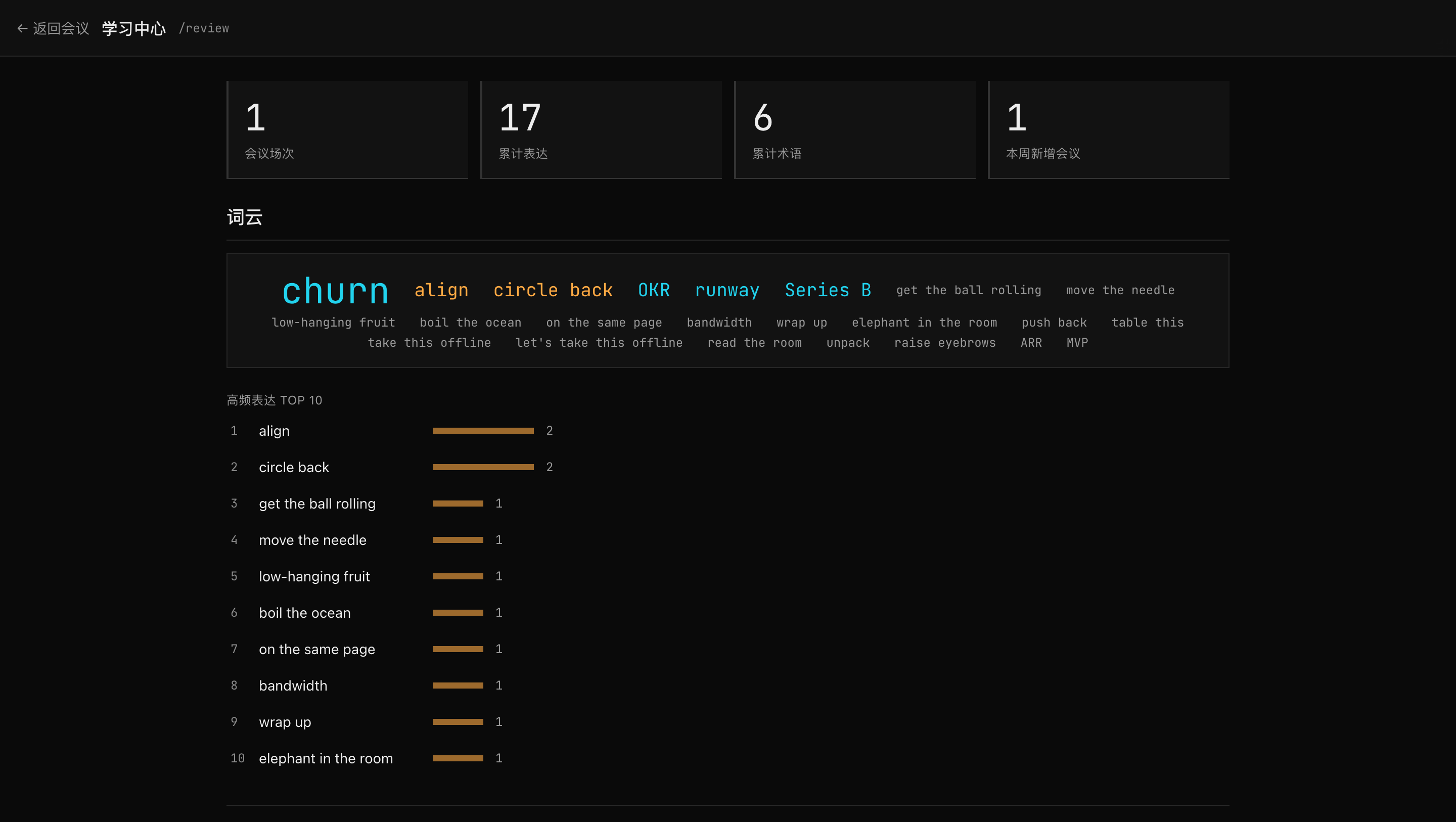
The personal glossary (我的词典) and the /review page turn detected cards into a lightweight learning center.
- Add glossary entries manually, or select transcript text to look it up first — matching packs and senses are listed, and a genuine miss is explained and translated — then choose
加入我的词典as a secondary action. Split entries across multiple named custom packs, each toggled on or off per meeting. - Surface-form capture (v0.7.1): saving a card records the exact wording it appeared as in that meeting, not just the dictionary's canonical form — save it after hearing "back on the envelope" and the entry keeps that surface form even though the headword is back of the envelope, so review and future detection both recognize the variant you actually heard.
- Known-word suppression: words you've mastered are suppressed on live cards, so the feed stays focused on what's still new.
- Due-driven review:
到期复习is a due-driven review queue with SM-2-lite spaced scheduling. - A stats strip (meeting count, cumulative expressions/terms, recent activity), a word cloud, a Top 10 list, and flashcards for quick practice.
- Anki TSV export, or one-click AnkiConnect sync (with dedup) into your local Anki, for serious spaced repetition.
Dictionary Packs
Seventeen built-in packs ship today — core expressions, meeting flow, project execution, feedback, sales and growth, softening/criticism, academic meetings, chitchat, business terms, tech terms, pharma/biotech, statistics, machine learning, bioinformatics, and more — over 1,000 entries in total. Every pack toggles on or off per meeting; core is always on.
Variant matching (85 entries) catches inflected and alternate forms — say keep the ball rolling and the dictionary's get the ball rolling still hits. A handful of everyday-English headwords in the stats/ML packs (mean, prior, attention, precision, …) stay opt-in — they only fire once you customize the enabled-pack list, so casual speech is never flagged under the default all-on state.
Settings has an official catalog you can browse and install from with one click — six specialized packs (medicine, biopharma, AI/ML, law, finance, engineering; 4,300+ terms total) published at jargonslayer-dicts, alongside file or GitHub-URL import for any third-party pack. Installed packs auto-check for updates once a day, and an installed pack's own definition takes precedence over a built-in one when both define the same term (v0.7.2+).
Want to build and publish your own pack? The manifest format, validation rules, and publishing walkthrough are in Power Users → Pack Authoring.
Exports and Integrations
- Markdown report, optionally with frontmatter for Obsidian/Dataview.
- docx export, ready to open as an editable Word file.
- Anki TSV for study cards, or one-click sync into your local Anki via AnkiConnect (with dedup).
- Full session JSON with
schemaVersion: 1. - Copy-to-clipboard summary.
- Cornell note export as PNG or Markdown.
On iOS, every export hands the file to the system share sheet.
Settings can also save every session to a folder as Markdown plus JSON (File System Access API, built for Obsidian vaults and agent workflows), POST a meeting.saved webhook to a custom URL after each save, and take a full backup of sessions, glossary, and settings — restores preview the contents before writing and sanitize risky settings. Payload formats, file-naming, and an example webhook receiver are in Power Users → Automation.
Appearance and Bit
Nine built-in themes ride a strict 17-token engine — hex-only, validated, injected as CSS custom properties rather than raw strings — each contrast-checked against WCAG AA, from the terminal defaults to a gothic gilt 魔典 and a pixel-art 像素 quest log. Beyond the built-ins, a custom theme editor lets you create from scratch or duplicate any theme, edit all 17 tokens with a native color picker plus a hex field each, and set a light/dark scheme. Contrast hints flag tokens that fall below the AA/UI-contrast bars as you go — they warn, they never block. Export a theme to JSON or import one; imported themes are re-minted with a new id, so an imported file can never shadow or overwrite a built-in.
Two independent font pickers (UI font, monospace font), an opt-in frosted-glass overlay for panels and drawers, and three type-size controls (global size, transcript-only size, transcript line spacing) round out the display settings — all local to this browser or app, none of it travels with your data.
The status-line pixel dragon, Bit, dresses to match each built-in theme by default — round reading glasses for 清晰, a straw hat for 水墨, a wizard hat for 魔典 — or any piece can be pinned manually. He spreads his wings and throws pixel sparks when a report finishes generating or the review queue clears.
Platforms
The macOS desktop app (Apple Silicon only, no Intel build) is the flagship surface: a signed, notarized DMG from releases/latest, self-managed local Whisper, and the system/app audio and 系统识别 engines the web app can't offer.
The web app installs as a PWA — from Chrome/Edge as a desktop-like window, or to an iOS/iPadOS home screen through Safari — or runs locally/LAN-hosted from a Next.js server. The hosted preview needs no install and includes a limited Soniox cloud-recognition trial (no key required, up to 3 clips per person per day, ~10 minutes max per clip, shared first-come quota); enter your own Soniox or Deepgram key and the preview switches to browser-direct BYOK with no trial caps.
The iOS app is in TestFlight beta, by invite, and needs iOS 26+; it runs on-device system speech recognition and on-device Apple Translation, no API key required.
The Chrome extension (Lite) installs load-unpacked from the release zip — it isn't on the Chrome Web Store — and is in maintenance mode: live mic capture plus the built-in dictionary and on-device translation in a side panel, and nothing beyond that (no LLM detection, no tab/system audio, no account).
Privacy by Design
- Every engine and mode has an explicit data path — not a blanket privacy promise.
- No account. History, settings, and keys live in local browser/app storage.
- Dictionary-only mode is fully local: no audio and no transcript text ever leaves the machine.
- BYOK keys are isolated per provider (v0.7.3) — switching LLM providers can no longer carry the previous provider's key to the new one's host.
- Local logs are hardened so they never carry meeting speech (v0.7.2).
诊断信息gives you a redacted diagnostics bundle for bug reports — recent app events and a scrubbed settings snapshot, never meeting audio or transcript text.
The full data-path table, engine by engine, is in the User Guide's Privacy section; the formal policy lives at privacy.html.
Deployment and Capabilities
The web app ships as a web app and PWA; it can be installed from Chrome/Edge as a desktop-like window, added to iOS/iPadOS home screen through Safari, or run locally/LAN-hosted from a Next.js server. The macOS desktop app and the Chrome extension are separate, independently versioned packages.
| Form | Status | Notes |
|---|---|---|
| Hosted preview | Available | Preview tier with transparent limits and greyed local-only features |
| Local web app | Available | Full local-first build |
| PWA install | Available | Uses existing manifest and icons |
| macOS desktop app (Tauri) | Available | Signed, notarized DMG on releases/latest; Apple Silicon only, no Intel build |
| Chrome extension (Lite) | Available, load-unpacked | Zip on releases; load-unpacked is the supported path (no Web Store listing for now); maintenance mode |
| iOS / iPadOS (beta) | TestFlight, by invite | Get in touch for an invite; iOS 26+, on-device system speech recognition, on-device system translation (Apple Translation, no key required). No Android or store listing planned — the PWA covers most mobile use cases |
Capability Matrix
| Capability | Chrome extension (Lite) | Preview (hosted) | Local web / Desktop |
|---|---|---|---|
| Dictionary detection (instant, offline) | ✓ | ✓ | ✓ |
| Live transcription | Web Speech (mic only) | Web Speech · Soniox limited trial (no key) · tab audio (same trial quota) | Web Speech · local Whisper · tab audio · system/app audio (desktop) · Soniox (BYOK, experimental) · Deepgram (BYOK) · ElevenLabs (BYOK) |
| AI detection / translation / summary | — | ✓ built-in demo key (rate-limited) | ✓ your own key (BYOK) |
| Import text / audio / video | — | ✓ | ✓ |
| Speaker diarization | — | shown, needs local sidecar | ✓ |
| History | Local IndexedDB, own database | IndexedDB | IndexedDB |
What's Next
None of this is promised on a date — development happens in short trains, and priorities move with field feedback. The macOS desktop app is the flagship surface going forward; the Chrome extension stays in maintenance mode.
- Jargon-density control (in design) — pick the domains your meetings live in and a difficulty tier, so detection matches your own vocabulary level instead of firing on everything the dictionary knows.
- Session artifacts (in design) — opt-in audio retention alongside a saved session, plus attachments (slides, notes) that feed into the post-meeting summary.
- English-only UI option (planned) — a full interface localization, so the app reads entirely in English end to end, not just its detection and definitions.
- Phone-first UI polish (planned) — tighter mobile chrome and clearer touch targets across the app.
- Automated signed releases (mostly done as of v0.7.5) — CI gates every change and now builds, signs, notarizes and staples the macOS DMG itself; the release notes are still written by hand before publishing.
Parked for now: realtime streaming transcription through the browser (an in-browser alternative to today's Whisper sidecar) and selecting transcript text to run a live web search. Screen capture as a session artifact is explicitly deferred past v1.0.